

More people now ask AI assistants questions they used to type into a search box, and AI agents increasingly fetch web pages on someone’s behalf. That raises a fair question for site owners: can those tools actually read and understand your site? An llms.txt file is part of the answer, but it’s only one piece.
This guide explains what AI crawlers and agents look for, what llms.txt is (and isn’t), and how to scan and fix your site with the free Crawlwise AI Readiness plugin. You’ll also get an honest take on what AI readiness can and can’t do for your traffic.
What “AI-Ready” Actually Means
AI readiness isn’t a ranking factor or a secret switch. It’s a set of basics that make your content easy for automated readers to find, fetch and interpret. Most of them overlap with good technical SEO.
Clean, structured HTML
Agents and crawlers parse your page markup. Proper headings, real lists and tables, and meaningful text (not text baked into images) make your content easier to extract. The block editor already outputs fairly semantic HTML, which is a good start.
Structured data
Schema markup (usually JSON-LD) tells machines what a page is about: an article, a product, an organization, an FAQ. Google’s Search Central documentation on structured data is the best place to learn the details. If you’ve followed our guide to FAQ schema in WordPress, you’ve already done some of this.
Crawler access
Your robots.txt decides which bots may fetch which URLs. Some site owners want AI crawlers to see everything. Others want to block training bots but allow search. Either way, the rules should be deliberate, not accidental. A stray physical robots.txt file or a CDN rule can quietly override what you set in WordPress.
Discovery files like llms.txt
llms.txt is a proposed plain-text file at the root of your site (/llms.txt) that gives language models a curated, Markdown-formatted overview of your most important content. Think of it as a short guide to your site written for machines.
A Reality Check Before You Start
It’s easy to oversell this topic, so let’s be clear:
- llms.txt is a proposal, not an official standard. Support varies between AI tools, and adding the file doesn't guarantee any tool will read it.
- Google says there are no extra requirements for its AI features. According to Google's guide on AI features and your website, regular SEO best practices apply to AI Overviews and AI Mode, and no special optimizations are needed.
- No tool can promise AI traffic. Being readable by agents removes obstacles. It doesn't create demand for your content.
So why bother? Because the fixes are cheap, mostly reversible, and they also help regular search engines. Removing technical blockers is worth doing even when the upside is uncertain.
Meet Crawlwise AI Readiness
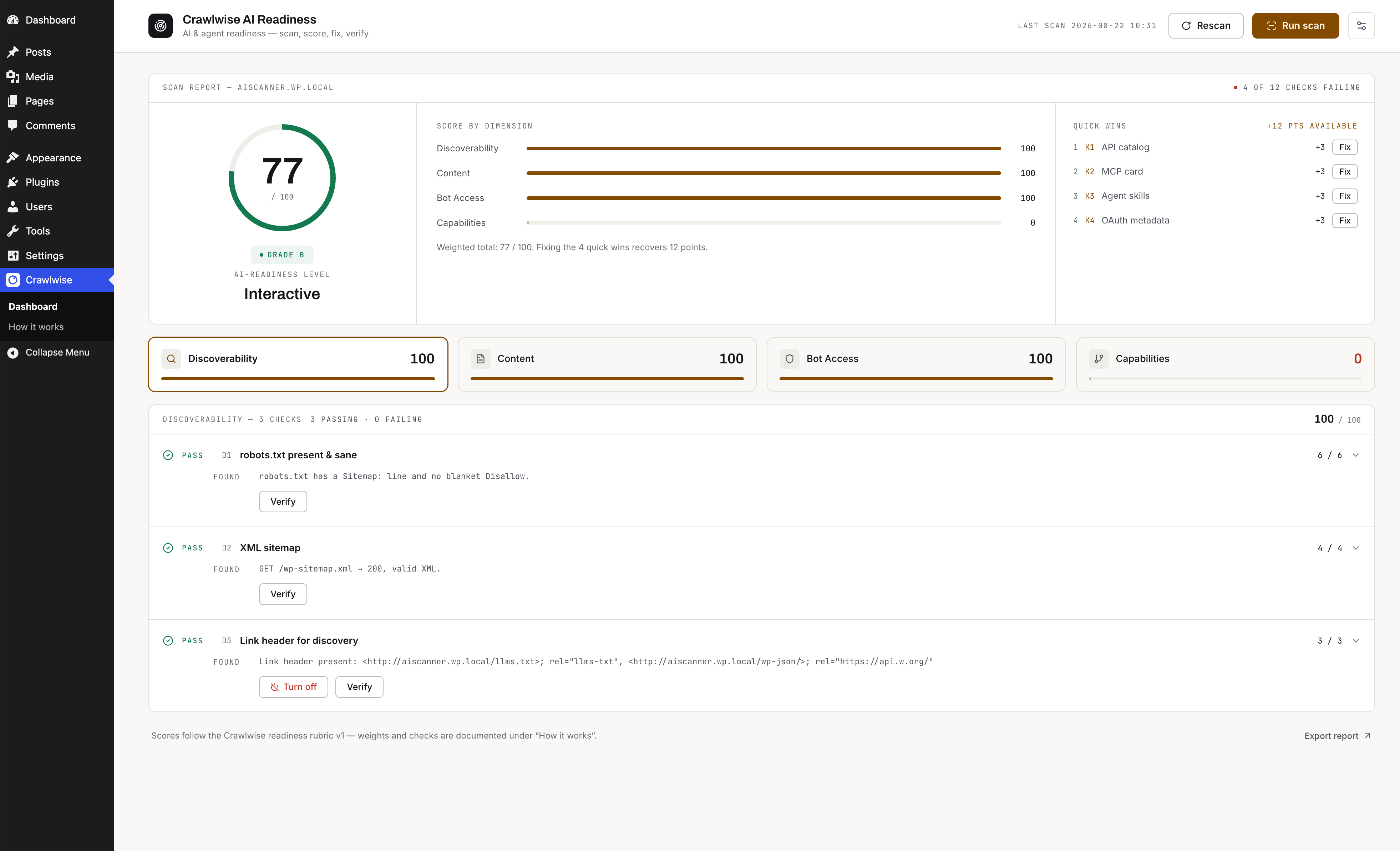
Crawlwise AI Readiness is a free plugin that grades how well your WordPress site holds up when the reader is an AI agent, then helps you fix what doesn’t. Its checks fetch your site over real HTTP requests, the way an agent would, instead of trusting internal settings. That means it can catch problems like a CDN or physical robots.txt file overriding WordPress.
It grades five areas:
- Discoverability: robots.txt sanity, XML sitemap and discovery link headers.
- Content: Markdown content negotiation,
/llms.txtand structured HTML. - Bot access: Content Signals, explicit AI-crawler rules and Web Bot Auth.
- Capabilities: API catalog, MCP card, agent skills and OAuth metadata.
- Commerce: UCP and x402 descriptors, for WooCommerce stores only.
A few details matter for real-world sites. Fixes only write plugin settings, with no theme edits or rewritten posts, so turning a fix off restores the previous state. The plugin detects Yoast, Rank Math and AIOSEO and defers to them feature by feature, so you won’t end up with two sitemaps or two JSON-LD graphs. And it only makes HTTP requests to your own site, with no telemetry.
Set Up llms.txt on WordPress with Crawlwise, Step by Step
Step 1: Install and activate
- Go to Plugins → Add New and search for "Crawlwise AI Readiness".
- Click Install Now, then Activate.
On activation, the plugin creates a table for score history and refreshes rewrite rules so routes like /llms.txt, .md versions of your content and .well-known files can resolve.
Step 2: Run your first scan
- Open Crawlwise AI Readiness in the admin menu.
- Click Scan to grade the site.
- Review the overall score, the breakdown by area and the ranked quick wins.
Each check shows its evidence, so you can see exactly what a crawler received rather than guessing.
Step 3: Apply fixes one at a time
- Start with the top quick wins, such as robots.txt issues or a missing
/llms.txt. - Apply the fix from the failing check.
- Click Verify to confirm the change over a real HTTP request.
- If a fix causes a problem, turn it off to restore the previous state.
Step 4: Decide on bot access
Open the plugin settings and review the bot access options. This is a business decision, not a technical one. Allowing AI crawlers may help your content appear in AI answers, while blocking some of them keeps your content out of certain uses. Google’s robots.txt introduction explains how these rules work.
Step 5: Fill in your schema details
In the schema markup settings, add your site identity, social profile links (sameAs), site search and the default schema type for each content type. If an SEO plugin already handles schema, Crawlwise defers to it, so check which plugin owns each feature.
Step 6: Check llms.txt and re-scan
- Visit
yoursite.com/llms.txtin a browser and read it like an AI would. Does it describe your site and link to your best content? - Run a new scan and compare it with your score history.
- Repeat after big site changes, like a redesign or a new section.
Only public content is included in llms.txt, the Markdown output and the JSON-LD graph. Password-protected, private, draft and specifically excluded posts are left out.
Troubleshooting Common Results
“Couldn’t verify”
Some hosts block a site from making HTTP requests to itself. When that happens, Crawlwise reports an informational result instead of a misleading pass or fail. Ask your host whether loopback requests are allowed.
Static export did nothing
If you enable static export, the plugin refuses to overwrite a robots.txt or llms.txt file it didn’t create. Remove or rename your existing file if you want Crawlwise to manage it.
Your robots.txt rules aren’t showing
A physical robots.txt file in your site root, or a rule at your CDN, can override the virtual file WordPress generates. The scan checks what’s actually served, which helps you find the real source.
Best Practices for AI Search Optimization
- Write clear, factual pages. Direct answers, specific details and up-to-date information help human readers and machines alike.
- Use real headings and lists. Structure in the HTML matters more than visual styling.
- Keep important content in text. Prices, hours and specs locked inside images are hard for any crawler to read.
- Curate your llms.txt. Point to your most useful pages, not every tag archive.
- Make crawler rules deliberate. Review them after installing security, CDN or SEO plugins.
- Measure honestly. Watch referral traffic from AI tools in your analytics rather than assuming results.
Frequently Asked Questions
Do I need llms.txt to appear in AI answers?
No. llms.txt is a proposal, and Google says there are no additional requirements for its AI features beyond normal SEO best practices. It’s a low-cost extra, not a requirement.
Will Crawlwise conflict with Rank Math or Yoast?
No. Crawlwise detects Yoast, Rank Math and AIOSEO and defers to them per feature, so you won’t get duplicate sitemaps, meta descriptions or JSON-LD graphs.
Does Crawlwise send my data anywhere?
No. The plugin only makes HTTP requests to your own site, sends nothing to third parties and has no telemetry.
Can I undo the changes?
Yes. Fixes only write plugin settings, with no theme edits or rewritten posts, so turning a fix off restores the previous state.
Conclusion: Your llms.txt Setup and Beyond
Making your site AI-ready comes down to clean HTML, solid structured data, deliberate crawler rules and, if you want it, a well-curated llms.txt file. None of it guarantees AI traffic, but it removes the obstacles that stop agents from understanding your content, and most of it helps regular SEO too.
Install Crawlwise AI Readiness for free, run your first scan and work through the quick wins. Then browse our other WordPress plugins to keep building a fast, well-structured site.


Leave a Reply
You must be logged in to post a comment.